A simple image editor for wine
If you use Ubuntu wine, you can easily use MS Paint instead of KolourPaint4. But this is strictly speaking piracy: Microsoft does not allow the use of MS Paint separately from windows. This inspired me to write a simple image editor for Linux Xubuntu that is written in WinAPI and runs through wine. In fact, when switching to a new LTS every 5 years, I cannot reuse deb packages with KolourPaint, and if everything is written in WinAPI, it will be enough for me to install wine and use binaries for windows.
The editor does not provide all the functionality of MS Paint from Windows XP, but you can take a screenshot, crop, frame, sign, copy and send a picture to a colleague. However, it is better to install xclip for this.
You need wine32, which, however, can be easily installed on 64-bit ubuntu.
What is DSG Image Editor?
This is the basic image editor for wine, which allows you to mark areas in a screenshot., describe why you selected them, crop out the excess, and draw lines and rectangles. For example:
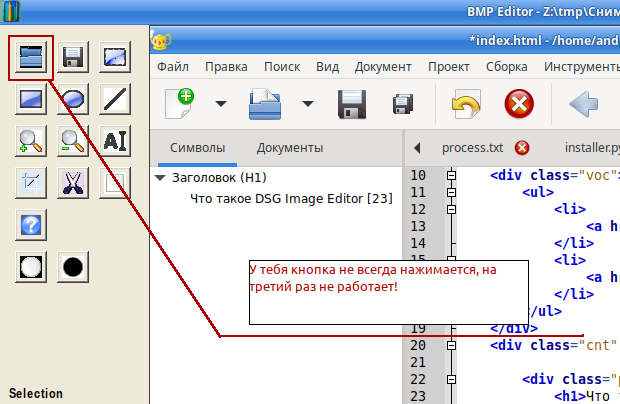
Example of a screenshot to send to a colleague
The tools are quite standard for an image editor:
 Open the file
 Save the file as...
 Selection
 Drawing a rectangle
 Drawing an ellipse
 Drawing a line
 Zoom in
 Reduce
 Add text
 Crop selection
 Cut out the highlighted
 Set the canvas size
 Help
 Rectangle mode (draw filled)
 Rectangle mode (draw only borders)
I don't see any point in describing these tools in detail in 2025.
There were not enough buttons on the toolbar for some actions, but you can use keyboard shortcuts.
Keyboard shortcuts
Keyboard shortcuts are quite standard:
- Ctrl+O - open the file
- Ctrl+S - save the previously opened file. Please note that always suggests saving the file with a new name. Ctrl+S saves the already opened one.
- Ctrl+X - cut selected area
- Ctrl+C - Copy the selected area for pasting into a Linux application (e.g., Messenger or ColorPaint). Xclip must be installed for this to work.
- Shift+Ctrl+C - Copy the selected area for pasting into another running instance of DSG Image Editor.
- Ctrl+V - paste a previously copied fragment
- Ctrl+Z - Undo the last action
- Ctrl+Y - Repeat the canceled action
- Ctrl+A - Select all
- Delete - Delete selected
- Shift - when entering the position of an inserted fragment, label, or simply selection, increases increment and decrement by 10 times (for more information, see the Features section.)
Features
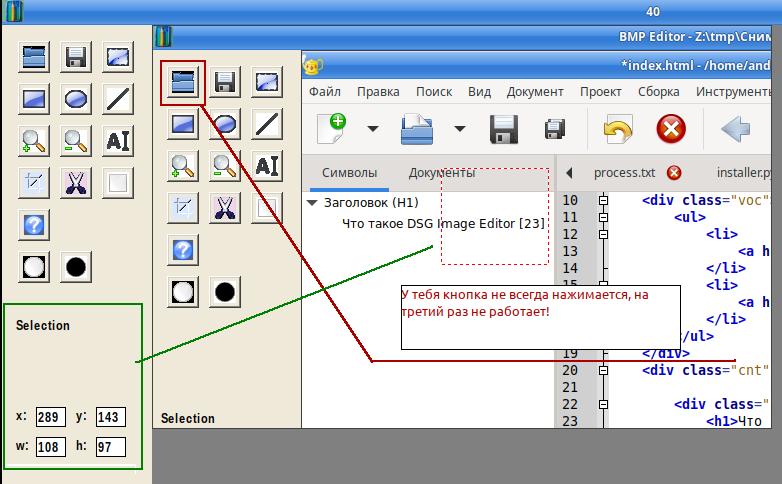
Selection size and position management
You can control the position and size of the selected area. There is something similar in Gimp, but it is relatively It's difficult to frame a fragment or just draw a rectangle.
You can also control the position of a text label or an image fragment inserted from the clipboard.
You can change the value in the x, y, w, and h fields not only by entering numbers, but also by using the cursor keys ("arrows"). If you press Shift at the same time, the values will change by 10 units, not one.
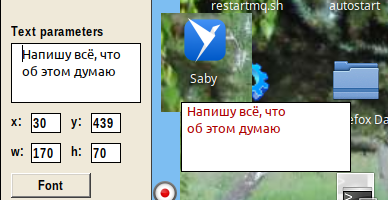
Text size and position control
The position of the text (and the inserted fragment) can also be controlled from the input fields.
After entering the text and moving it to the right place (of course, you can also drag it with the mouse), you need to change the tool (for example, "Highlight" or "Line") to capture the result.
Dependencies
In order for the copied image fragments to be available in the ubuntu clipboard (for example, to paste into the messenger), you need to install xclip
sudo apt-get install xclip
The WMAX Philosophy
This program appeared because wine does not have an image editor like mspaint (there is notepad, but there is no paint).
You can say that linux ubuntu has Gimp, KolourPaint, and generally many more things.
Example of a screenshot to send to a colleague
But in Gimp it is very difficult to make such a simple screenshot without having special skills.And I noticed that I have to download KolourPaint again every time I upgrade to a new LTS., and in order for DSGImageEditor to work, it will be enough for me to get an up-to-date wine.
This is just the beginning of the WMAX (Wine Maximum) philosophy, which has the ultimate goal of creating such a Linux distrubute., in which a windows user would not see any fundamental differences from the usual system.
DSG Image Editor V 0.0.1
Why is it called that
DS is an abbreviation for DeepSeek, which approximately 90% of the code has been created.
G is an abbreviation of G++ 3.4.5, which is used to compile this code.